Posts tonen met het label gps. Alle posts tonen

15 december 2010

iPhone-apps: WakeUpNow

WakeUpNow is een reiswekkertje in de waarste zin van het woord: het maakt je wakker als je je bestemming hebt bereikt. De app is een crime om in te stellen en door de continue gps-updates is je iPhone in no time leeg, maar het Engels in de interface is zo, nou ja, eigenaardig, dat het bijna Messiaans poëtisch wordt: Save the Completed. You are here to save.

iPhone may not be able to locate exactly in shaded aresStored information does not existYou are here to saveSave the Completed
Take it easy from now on....!

Still asleep in the morning, extra spare time at lunch, tired night, we always have to move a step forward to somewhere.
You probably have experienced of passing your destination because of your heavy eyelids from long day, right?
What about when you were listening to music or reading book on the public transportation?

You barely got off at your destination couple times.
"WakeUpNow" App is the best solution someone like you.

"WakeUpNow" App is not used by a simple carried base station location.
It is mounted the finest technologies for iPhone 3GS, such as GPS, 3G, WIFI. So that it will search your destination location and provide you a more accurate alarm system.
Now, you can relax and take break on any public transportation.


zzz

25 november 2010

The Reverse Geocache™ Puzzle Box

Het hele verhaal hier (lang).

De samenvatting, geleend van Blog Less:
"Imagine receiving a little wooden box that looks like it holds a treasure. The box cannot be opened. There is a button on top and an LCD display. You press the button and the display reads, “This is attempt 1 of 50. Distance: 55km. *Access Denied* Powering off…”. The next time you press the button, in a different location: “Attempt 2 of 50″ and a different “Distance” reading. And so on, until you’ve figured out that the box, equipped with a GPS inside, is leading you to one specific location where the box can be opened and the treasure inside it claimed."

08 juni 2010

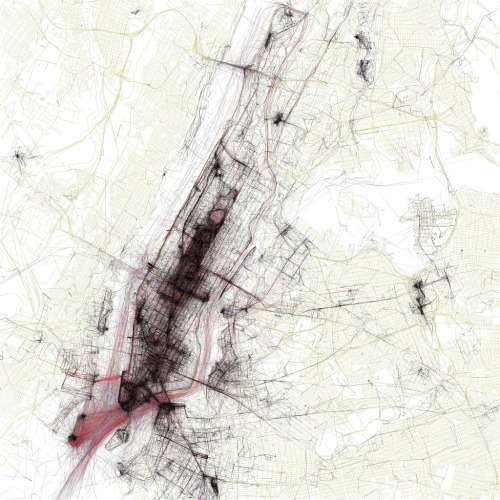
The Geotaggers’ World Atlas #1: New York


"The maps are ordered by the number of pictures taken in the central cluster of each one. This is a little unfair to aggressively polycentric cities like Tokyo and Los Angeles, which probably get lower placement than they really deserve because there are gaps where no one took any pictures. The central cluster of each map is not necessarily in the center of each image, because the image bounds are chosen to include as many geotagged locations as possible near the central cluster. All the maps are to the same scale (a square measuring 15 miles on each side), chosen to be just large enough for the central New York cluster to fit. The photo locations come from the public Flickr and Picasa search APIs."

The Geotaggers' World Atlas (thumbnails, Flickr)

26 mei 2010

iPhone-apps: Geocaching Intro

Laagdrempelig geocachen. Met Geocaching Intro (een gratis lite-versie) krijg je drie geocaches in de omgeving aangereikt en kun je direct aan de slag met de geïntegreerde kaart en het bijbehorende kompas.
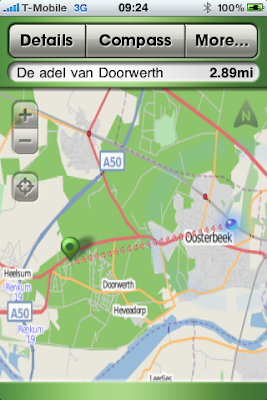
Schermafbeelding Geochaching Intro: kaart, De adel van Doorwerth
Geochaching Intro: kaart
Als je in de buurt van de cache komt, kun je de 'hint'-functie gebruiken om te zien of er nog extra info is om de cache gemakkelijker te vinden. En dan:
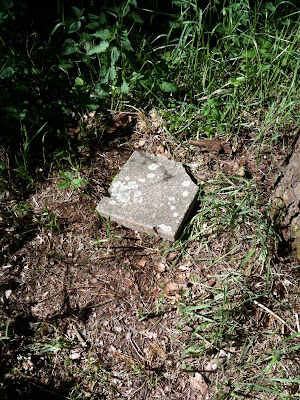
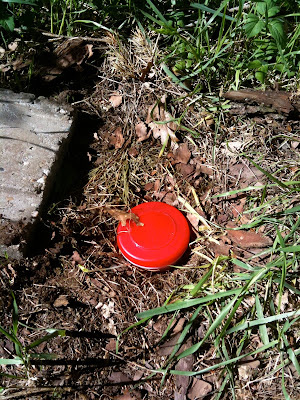
Geocache 'De adel van Doorwerth'
Geocache 'De adel van Doorwerth': SenV2312
Les 1 voor newby's: pen meenemen om het logboek af te tekenen. Als je geen zin hebt om de volledige versie (€ 7,99) te kopen, kun je op geocaching.com een account aanmaken om je vondsten digitaal te registreren.

Geocaching Intro voor iPhone

05 augustus 2009

iPhone-foto's: geotagging

Het geotaggen van foto's op de iPhone werkt aardig maar allesbehalve foutloos. Onderstaande foto is duidelijk genomen in het Teylers Museum in Haarlem.

Foto ovale zaal Teylers Museum
Als je de foto op de Mac opent in Voorvertoning en vervolgens klikt op Extra's > Info (Meer info > GPS) krijg je het volgende schermpje te zien:

Screenshot Info-venster Voorvertoning
Als je vervolgens linksonder op 'Zoek' klikt, wordt Google Maps opgestart en wordt de locatie weergegeven:

Screenshot Google Maps, Haarlem
Zoals gezegd: aardig maar allesbehalve foutloos.

Geotagging (Wikipedia, Engelstalig)